Gacha Club Custom MOD APK Download Free For Android & Ios
25 Oct 2026Size
100.0 MBVersion
V1.1.12Requirements
Android & IosDownloads
10K+
Description
Every character has a story, and Gacha Club lets players bring those stories to life in a fun way. From choosing hairstyles and outfits to creating unique faces and expressions, the game lets players use their imagination to build characters that match their ideas. Gacha Club Custom MOD APK attracts attention from fans who enjoy character design and want to explore different customization possibilities.
What makes Gacha-style games enjoyable is the freedom to create something personal. You can design cute characters, try different clothing styles, mix colours, and give each character its own look. Depending on the version, it offers extra customization options or modified content that gives players more ideas to explore.
For anyone who loves anime-inspired art, character styling, and creative storytelling, this game is an interesting topic to discover. In this article, we will look at its possible features, character customization options, creative tools, and installation details in simple English. If you also enjoy mobile gaming, you can explore Smoq Games 26 MOD APK to learn more about its features and gameplay. Since custom versions can differ, it is always helpful to check which features are actually included before downloading.
How the MOD Version Works for Gacha Club Enthusiasts
For players who love creating anime-style characters, Gacha Club Custom MOD APK can sound like an exciting way to explore character design. Custom versions may offer extra outfits, hairstyles, accessories, or other creative options, depending on the build. These possibilities can give players more ideas for designing characters that match their imagination and personal style.
Another appealing part is the freedom to experiment with different looks and character combinations. Players can enjoy mixing colours, choosing outfits, creating different expressions, and building characters for their own stories. For Gacha Club enthusiasts who enjoy making original characters, these creative activities can turn a simple design idea into something more personal and enjoyable.
Before downloading Gacha Club Custom MOD APK, take a moment to check the features included in the specific version. Different builds may offer different customization options, so reading the details helps you understand what you can expect. Choose a trustworthy source, check compatibility with your Android device, and remember that unofficial files can carry security risks.
Unlimited Gems, Coins, and Custom Color Palettes Unlocked
More Gems for Creative Choices
Gems can be an important part of the Gacha Club experience, depending on the version and its available features. Some custom builds may advertise extra gems, giving players more opportunities to explore certain in-game options. The actual amount and availability depend on the specific version.
Extra Coins for Game Activities
Coins can help players access different features and activities within a game. Some versions of the latest Gacha Club Custom MOD APK may advertise additional coins for players who want to explore more of the available content. Check the version details to see which changes are included.
Custom Color Palettes for Unique Characters
Colours can completely change the look and personality of a character. Custom color palettes, when available, can help players experiment with different shades for hair, clothing, eyes, and accessories. This gives character designers more room to develop their own visual style.
Create Characters With Your Own Style
A wide range of colours can make character creation more enjoyable. Players can try soft pastel shades, bright colours, dark outfits, or combinations that match a character’s personality. Small design choices can help make each creation feel different.
Mix and Match Different Looks
Character customization becomes more interesting in the Gacha Club Custom MOD APK when players can combine clothing, hairstyles, accessories, and colours. Depending on the build, additional options may give players more combinations to experiment with and help them create characters for different stories.
More Room for Creative Ideas
For Gacha Club fans who enjoy designing original characters, extra customization options can provide fresh inspiration. Players can create characters for friendship stories, fantasy adventures, school settings, or their own imaginative worlds.
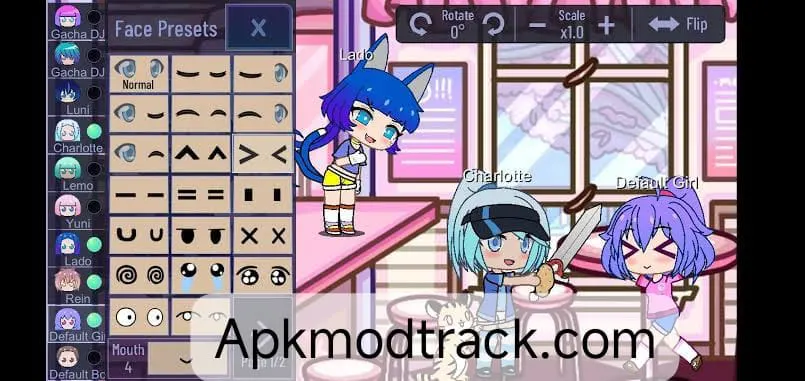
Free Access to Thousands of Custom Hair, Outfit, and Accessory Assets in Gacha Club Custom MOD APK
A Wide Range of Hairstyles
Hairstyles help give every character its own look and personality. Gacha Club Custom MOD APK may offer extra hair options in certain versions, allowing players to explore different lengths, colours, and styles. From short, simple cuts to long, colourful hairstyles, these choices can make character design more enjoyable.
Stylish Outfits for Every Character
Clothing is an important part of creating a memorable Gacha character. Depending on the version, custom builds may include additional outfit choices for different themes and styles. Players can experiment with casual clothes, fantasy-inspired looks, school outfits, and other creative designs.
Accessories to Complete the Look
Small details can make a character stand out. Accessories such as hats, glasses, bows, and other decorative items may be available in some versions. Combining these items with different outfits can help players create a look that feels personal and original.
Mix and Match Different Fashion Styles
One of the fun parts of character creation is trying combinations that you might not normally consider. Players can mix hairstyles, clothing, and accessories to create cute, cool, funny, or fantasy-inspired characters. Each combination offers another chance to explore a new design.
Create Characters for Your Own Stories
Custom hair, outfits, and accessories can help bring story ideas to life. Players can design characters for school adventures, fantasy worlds, friendship stories, or original anime-inspired scenes. A character’s appearance can also help show their personality without needing a long description.
Explore Different Colours and Designs
Colours can change the entire feeling of a character. Players can try matching shades for a coordinated outfit or combine contrasting colours for a bold look. Depending on the available customization tools, these choices can help make each design more distinctive.
Give Every Character a Unique Identity
The best part of customization is having the freedom to create characters that reflect your imagination. Different hairstyles, outfits, and accessories make it easier to explore new ideas and develop a collection of original designs.
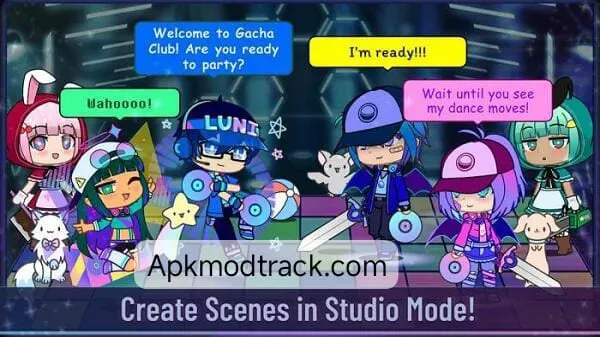
Advanced Studio Mode Mechanics for Custom Anime Storytelling and Memes
Create Your Own Anime Scenes
Studio Mode lets players arrange characters and backgrounds to create their own scenes. It can be a fun way to turn simple character designs into small anime-style stories. Depending on the version, players may have different scene-building options to explore.
Place Characters in Different Positions
Character placement helps make a scene feel natural and interesting. You can arrange characters side by side, place them in the background, or position them to show a conversation. Trying different layouts can help your story look more lively.
Use Different Facial Expressions
Expressions help show what a character is feeling without using too many words. Happy, surprised, confused, and serious expressions can give a scene more personality. Combining expressions with character positions can make your storytelling more engaging.
Choose Backgrounds for Every Story
A good background helps set the mood of a scene. You might choose a classroom for a school story, a bedroom for a casual conversation, or a fantasy setting for an imaginative adventure. Available backgrounds depend on the version you use.
Create Funny Anime Memes
Gacha characters can also be used to make funny scenes and meme-style content. A surprised face, an unexpected reaction, or a humorous conversation can turn an ordinary scene into something entertaining. You can experiment with different expressions and character combinations to find ideas that work.
Add Dialogue to Your Scenes
Dialogue helps viewers understand what the characters are saying and thinking. Short conversations, funny replies, and dramatic reactions can make a scene more interesting. Keep the wording simple, so the main idea is easy to follow.
Build Stories With Multiple Characters
Using several characters can make your scenes feel more complete. You could create a friendship moment, a school discussion, a family scene, or a funny group conversation. Giving each character a different personality can make the story more enjoyable to create.
Experiment With Scene Layouts
Changing the positions, backgrounds, and expressions can give the same characters a completely different feel. You can try different arrangements until the scene matches your idea. This freedom makes Studio Mode useful for exploring creative possibilities.
Turn Your Scenes Into Shareable Content
Once you have created a scene, you may be able to capture it as an image and share it with friends or on social platforms. This can be a fun way to show your character designs and storytelling ideas. Sharing and export options depend on the app version and your device.
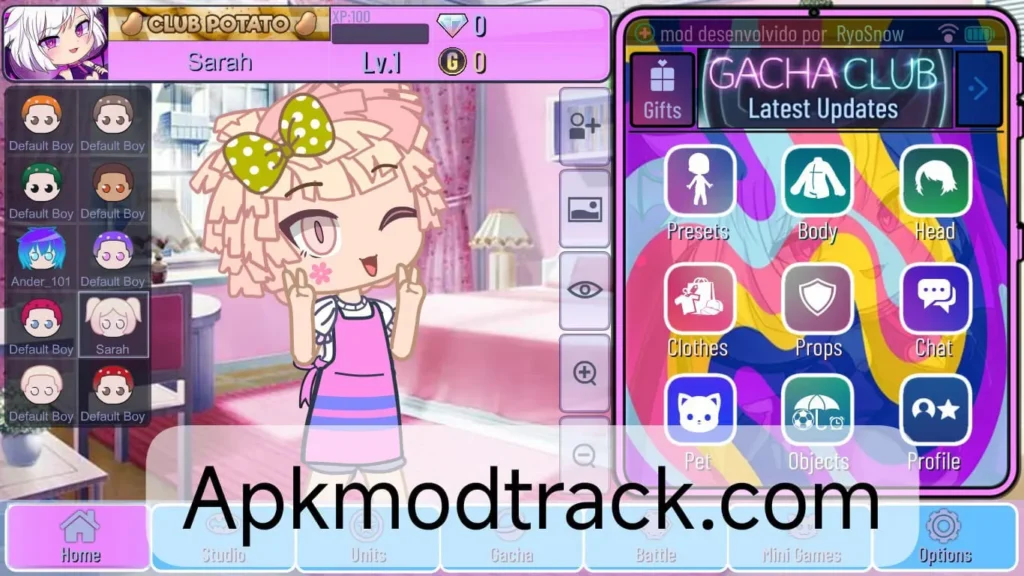
How to Download Gacha Club Custom MOD APK on Android and iOS
Download on Android
- Start by checking your Android phone’s storage space and system requirements. Find the version details for Gacha Club Custom MOD APK and review its advertised features, such as custom outfits, hairstyles, accessories, and Studio Mode options.
- Before downloading, make sure the source is trustworthy and the file matches the version you want. Once you have verified the file, follow Android’s installation instructions and review any security warnings carefully. After installation, open the game and explore the available customization features.
Download on iOS
- The installation process is different on iPhones and iPads because iOS does not support Android APK files directly. Gacha Club Custom MOD APK may not have a compatible iOS version, so check whether a version specifically made for iOS is available.
- Be careful with websites that promise special MOD installations or ask you to install unknown configuration profiles. Check the source and compatibility information before proceeding. Once you have a compatible version from a trustworthy source, follow its documented setup instructions and explore the customization options available.
Custom Eye Pupil Adjustments, Face Highlights, and Skin Tone Sliders
Custom Eye Pupil Adjustments
Eyes can give a character a special look and help express their personality. Gacha Club Custom MOD APK may offer additional eye styles or pupil designs, depending on the version. Players can experiment with different shapes, colours, and eye combinations to create cute, mysterious, cheerful, or anime-inspired characters.
Different Eye Colours and Styles
Eye colour can make a big difference to a character’s overall design. Players can try bright blue, soft pink, green, purple, or other shades to match their characters’ outfits and hairstyles. Combining different colours can also help make each design feel unique.
Face Highlights for Extra Detail
Face highlights can add a soft shine to a character’s appearance. Depending on the available customization options, players may be able to explore different highlight styles and facial details. These small touches can make a character look more polished and expressive.
Customize Facial Expressions
Facial expressions help show emotions such as happiness, surprise, sadness, or excitement. Players can combine eye styles with different expressions to create characters that fit their stories. This is especially useful when designing scenes for anime-style storytelling.
Skin Tone Customization
Skin tone options allow players to create characters with different appearances in the latest version of Gacha Nebula MOD APK. If the version includes skin tone sliders or expanded colour choices, users may be able to adjust shades to match their creative ideas. This gives them more freedom when designing original characters.
Fine-Tune Colours for a Natural Look
Choosing colours that work well together can help create a balanced character design. Players can experiment with skin tones, eye colours, and facial details to match the character’s overall style. Even small adjustments can give a design a different mood.
Create Your Own Anime Character Style
Combining eye customizations, facial highlights, and skin tones can make character creation more enjoyable. Players can develop original designs for fantasy stories, school scenes, friendship groups, or personal anime-inspired projects.
Offline Studio Mode Playback With Zero Wi-Fi or Mobile Data Requirements
Create Scenes Without an Internet Connection
Offline access can be useful for players who enjoy creating characters and scenes whenever they have free time. If your version of Gacha Club Custom MOD APK supports offline Studio Mode, you may be able to arrange characters and backgrounds without connecting to Wi-Fi or mobile data.
Enjoy Studio Mode Anywhere
Offline Studio Mode can make creative activities more convenient when you are travelling or away from an internet connection. You can focus on designing characters, choosing poses, and arranging scenes whenever the required features are available on your device.
Arrange Characters and Backgrounds
Studio Mode lets players build scenes using characters and backgrounds. You can place characters in different positions, choose suitable expressions, and create layouts for funny moments or anime-inspired stories. The available options depend on your game version.
Create Anime Stories Offline
Players who enjoy storytelling can use scenes to show conversations, friendships, and imaginative adventures. When the relevant Studio Mode features work offline, you can spend time arranging your story without needing a continuous internet connection.
Save Your Creative Work
Saving your progress helps you return to your designs later. The available saving and export options depend on the version, so check whether your creations can be saved locally on your device without an internet connection.
Enjoy Fewer Online Distractions
Working offline means you do not need a continuous connection for Gacha Club features that operate entirely on your device. However, this does not guarantee an ad-free experience, because advertisements and some other features may depend on the particular version.
Summary
Gacha Club Custom MOD APK brings a creative space where simple ideas can turn into colourful characters and entertaining stories. You can imagine a character, give it a special look, choose matching clothes, and build a whole personality through small design details. Studio Mode adds another layer of creativity by letting you arrange characters into scenes that can feel funny, dramatic, or full of friendship. Depending on the version, extra customization items may give you more styles to explore and new ideas to try. Whether you enjoy designing original anime characters or creating little stories with them, the best part is having the freedom to experiment and make something that feels truly your own.
FAQs
What is Gacha Club Custom MOD APK?
Gacha Club Custom MOD APK is an unofficial modified version associated with the original character-creation game. Depending on the build, it may offer additional outfits, hairstyles, accessories, or other customization options.
Can I create my own anime characters in Gacha Club Custom MOD APK ?
Yes, character creation is one of the main attractions of Gacha Club. You can experiment with hairstyles, clothing, colours, facial expressions, and accessories to develop your own anime-inspired designs.
Does it include extra outfits and hairstyles?
Some custom versions advertise additional clothing, hairstyles, and accessories. The available items depend on the particular version, so check its feature details before downloading.
Can I use Studio Mode without the internet in Gacha Club Custom MOD APK ?
Some Studio Mode features may work offline. However, offline access depends on the version, and certain functions may require an internet connection.
Is Gacha Club Custom MOD APK available for iOS?
An Android APK cannot be installed directly on an iPhone or iPad. A compatible iOS version would need to be available separately, so check the source and compatibility details carefully.